

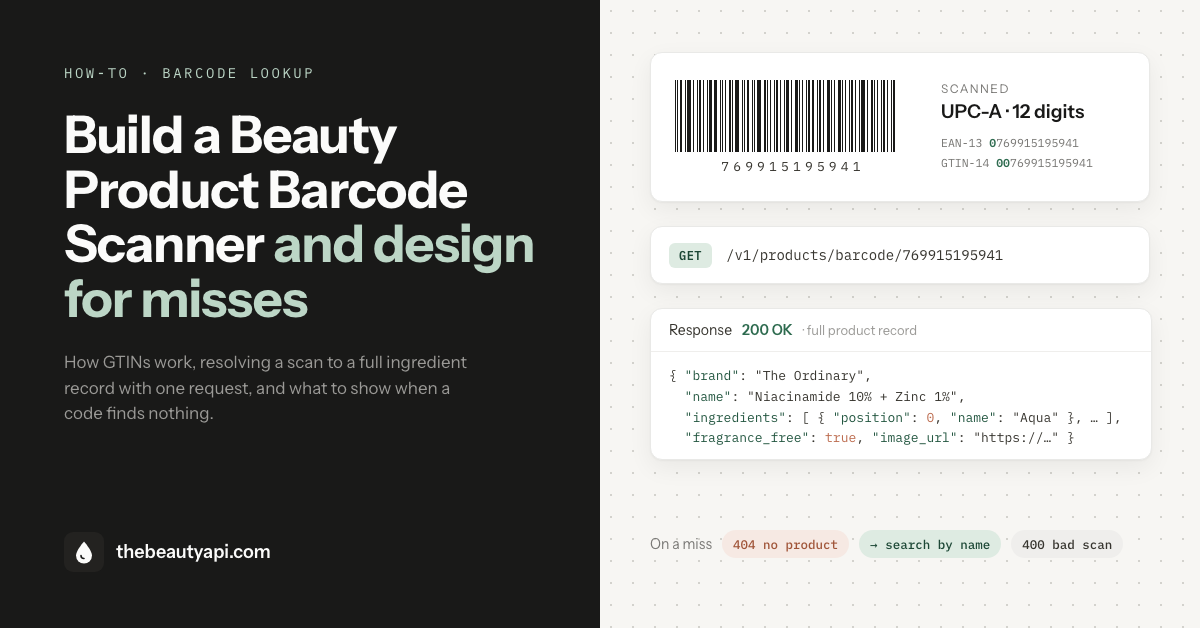
Executive Summary: A barcode scanner is the most intuitive user experience for a beauty app: point the camera at a bottle, get the product and its ingredients. The part that separates good apps from terrible ones is what happens when there's a miss since barcodes are exact keys and no product database on earth covers all of them. This guide covers how barcodes actually work, how to resolve a scan with The Beauty API, and how to design the fallback path.
How barcodes actually work
Let's start from the top.
The numbers under the bars are GTINs (Global Trade Item Numbers), issued under the GS1 system. A brand licenses a GS1 Company Prefix, a run of digits that identifies the company, then assigns the remaining digits to individual products, and the final digit is a check digit computed from the rest. Two things follow from that structure, and both matter before you write any code.
The same product carries many codes. GS1 gives every sellable variation its own GTIN: each shade of a foundation, each size of a moisturiser, each scent in a body-wash line. A "product" as your users think of it (The Ordinary Niacinamide 10% + Zinc 1%) can map to several GTINs, so a database keyed by product needs to hold all of them.
One code has several written forms. The common retail formats are UPC-A (12 digits, dominant in North America), EAN-13 (13 digits, most of the rest of the world), and GTIN-8 for small packaging; GTIN-14 is the 14-digit canonical form that contains all the others by left-padding with zeros. A UPC-A of 769915195941 and its zero-padded GTIN-14 00769915195941 are the same code. Scanner libraries differ in which form they hand you. If your lookup layer doesn't treat the padded forms as identical, you will create misses that aren't real.
Step 1: Scan the code
Any maintained scanning library works: ML Kit or the iOS Vision framework natively, or a cross-platform wrapper in React Native and Flutter. Configure it for the retail formats (EAN-13, UPC-A, EAN-8) and ignore QR codes. Then normalise what the library gives you: strip separators and whitespace, send digits only.
// Normalize a scan result to bare digits
const normalize = (raw) => raw.replace(/\D/g, "");
Step 2: Resolve it to a product
The Beauty API's barcode-enabled plans expose a lookup endpoint that takes the code in any GTIN form, 8 to 14 digits, no separators:
const BASE = "https://api.thebeautyapi.com"; // same base URL on every plan

async function lookupBarcode(code) {
  const res = await fetch(`${BASE}/v1/products/barcode/${normalize(code)}`, {
    headers: { "x-api-key": process.env.BEAUTY_API_KEY },
  });
  if (res.status === 404) return null;        // no product carries this code
  if (!res.ok) throw new Error(`lookup failed: ${res.status}`); // 403 = plan without barcode lookup
  return res.json();                          // the full product record
}
A hit returns the same record as a product fetched by ID: brand, name, the full ingredient list in label order with INCI names and safety ratings, the free-from flags, and a product image. Three behaviours are built in so you don't have to handle them yourself:
- Any zero-padded form of the same code resolves identically (UPC-A, EAN-13, GTIN-14).
- Both unit codes and sibling-variant codes resolve: scanning any shade or size in a line returns its product.
- A malformed code (letters, wrong length) returns 400 rather than a false miss, so you can tell "bad scan" apart from "unknown product".
Step 3: Design for the misses
No barcode database is complete, ours included. Build the miss path as a real feature and users will forgive it. Ignore it and the app feels broken by the third scan.
Fall back to search, immediately. A missed barcode usually isn't a missing product, just a missing key: the product is very likely in the catalogue under its name. On a 404, drop straight into a search box, pre-focused for typing, backed by the search endpoint:
async function resolveScan(code) {
  const product = await lookupBarcode(code);
  if (product) return { via: "barcode", product };
  return { via: "search" };  // show the search UI: GET /v1/products/search?q=...
}
Search matches brand and name prefixes, so "ordinary niac" finds the product in two words. A couple of characters is usually enough.
Say the right thing. "Product not found" reads as failure. "We don't have this barcode yet, search by name instead" is honest and gives the user their next step. That change costs you one string.
Cache the hits. Barcode lookups repeat heavily (the same user re-scans, popular products dominate) and the catalogue changes on a release cadence, not in real time. Caching resolved products by GTIN-14 for a day cuts your call volume and makes repeat scans instant.
Misses are logged on our side. The Beauty API records barcode lookups that return no match, and we use those logs to backfill the missing barcodes and products as soon as we can. Coverage grows with each release, so a code that misses today may well resolve after the next one, with no change on your end.
The economics of the miss path
One more reason to build the fallback well: it changes what coverage is worth. Without it, every missing code is a dead end. With it, a miss costs the user a few seconds, and the lookup quietly improves underneath your app as we backfill. The scanner keeps working even when the database doesn't have the code yet.
Try it
Barcode lookup is available on the barcode-enabled API plans, and the rest of the flow (search, full product records, ingredient data) runs on any plan, including the free Sandbox tier. The API documentation has the endpoint reference, our Postman guide includes a ready-made barcode request, and if you have any queries, reach out to us anytime.